Once your CRM integration has passed validation and you have defined your sales funnel, you can launch campaigns that optimize toward high-quality leads instead of raw form submissions.
Note
Conversion Leads optimization is only available after validation is complete and your funnel is configured in Events Manager. Attempting to select it before setup finishes will not work.
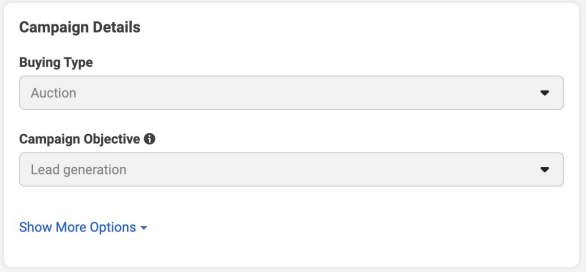
Campaign Objective
Create a new campaign in Meta Ads Manager and select Leads as the campaign objective. This objective is required for Conversion Leads — it tells Meta you are collecting leads through Instant Forms or Messenger.
Ad Set Configuration
At the ad set level, configure the following settings:
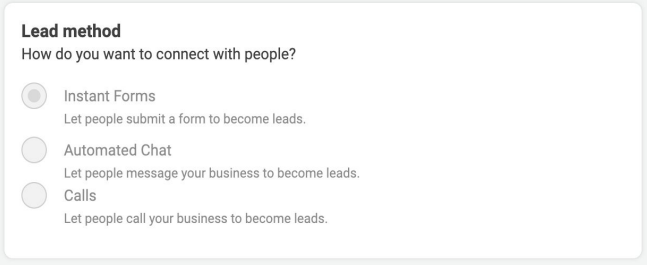
Lead Form
Use an Instant Form for higher-quality leads. Instant Forms keep users on Facebook or Instagram instead of redirecting to an external landing page, which typically improves completion rates and lead quality scores.
Page Selection
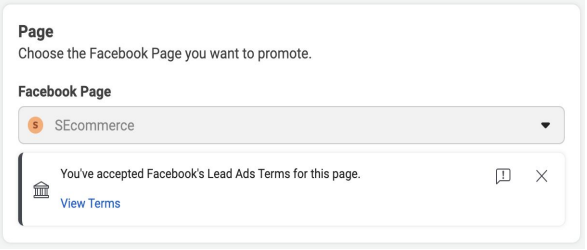
Choose the Facebook Page (or Instagram account) that will be associated with the leads. The Page must be connected to the CRM Pixel you set up for Conversion Leads.
Optimization for Conversion Leads
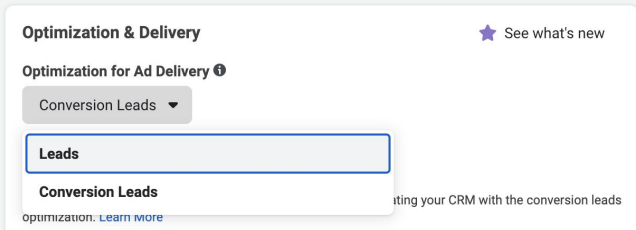
In the ad set optimization settings, select Conversion Leads as the optimization type. This option appears only after your CRM integration has completed validation and funnel setup.
With Conversion Leads selected, Meta optimizes delivery toward users most likely to reach the funnel stage you defined as your optimization target — not just users likely to fill out a form.
Ad Creative
At the ad level, link your creative to the Instant Form configured in the ad set. No additional Conversion Leads-specific settings are needed at the ad level — optimization is controlled at the ad set.
Settings Checklist
- Campaign: Objective set to Leads (Lead generation).
- Ad Set — Form: Instant Form selected for lead capture.
- Ad Set — Page: Correct Facebook Page associated with leads.
- Ad Set — Optimization:Conversion Leads selected (available after validation and funnel setup).
- Ad: Creative linked to the Instant Form from the ad set.
Monitoring Performance
After launch, monitor two layers of performance:
- Ads Manager — cost per lead, lead volume, and campaign delivery metrics.
- Events Manager — CRM event match rates and funnel progression to confirm leads are moving through your mapped stages.
Give the model time to learn
Conversion Leads campaigns improve as Meta receives more CRM stage updates. Expect the learning phase to take 1–2 weeks after launch before optimization stabilizes. Avoid making major funnel or targeting changes during this period.