After your CRM events start flowing to Meta through SignalSight, you enter a validation phase — typically lasting about 7 days. During this window, Meta verifies that your CRM data is accurate, complete, and correctly matched to Facebook-generated leads before allowing you to configure your sales funnel and run Conversion Leads campaigns.
Note
This guide applies to every CRM integration — Zoho, HubSpot, Salesforce, and others. The validation requirements are the same regardless of which CRM you use.
What Happens During Validation
Meta monitors the CRM events arriving at your Pixel and checks them against the leads generated through your ad campaigns. You work closely with the data shown in Events Manager to identify and fix any errors before you can proceed.
- CRM events are received and displayed in Events Manager under your CRM Pixel.
- Meta flags mismatches, missing fields, or coverage gaps.
- You correct issues in your CRM mapping or SignalSight configuration.
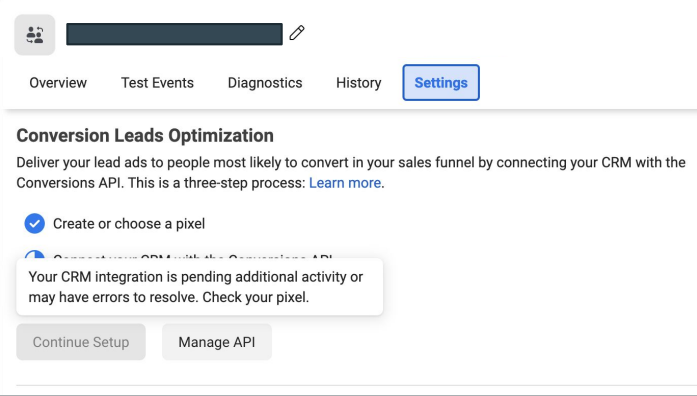
- Once all errors are resolved and coverage targets are met, validation completes and the Continue Setup button becomes available.
Monitoring CRM Events
Open Events Manager and select your CRM Pixel. The Overview and Diagnostics tabs show event volume, match rates, and any errors Meta detects. Check these regularly during the validation window.
- Confirm events are arriving with the expected volume — roughly matching the number of Meta-generated leads in your CRM.
- Look for lead_id match failures. These usually mean the Meta Lead ID is missing or incorrectly mapped in your CRM.
- Review event names and payloads to make sure they reflect actual CRM stage changes, not duplicate or test data.
Exit Requirements
To exit the validation phase, your CRM events must meet two criteria:
Lead Coverage
Your CRM events should cover the vast majority of Facebook-generated leads. If 100 leads were created in a day, your CRM events for that day should account for nearly all of them. Gaps in coverage delay validation and reduce optimization quality once campaigns go live.
Event Variety
Meta needs enough distinct CRM events to understand your sales funnel. Requirements:
- Minimum: 2 distinct events — the initial lead event (matching a Facebook-generated lead) and a target CRM event you want to optimize toward.
- Recommended: 3–4 distinct events so the model learns a more complete view of your funnel (e.g., New Lead → Contacted → Qualified → Won).
All errors must be resolved
Validation does not complete until every flagged error is fixed. Address issues as they appear rather than waiting until the end of the 7-day window — this keeps the timeline as short as possible.
Common Issues and Fixes
- Missing lead_id — ensure the Meta Lead ID is mapped in your CRM source configuration and populated on every lead record that originated from Meta.
- Low event volume — verify that CRM stage changes are triggering events. Leads sitting in a single stage without updates won't generate new events.
- Duplicate events — check that your CRM isn't sending the same stage change multiple times for a single lead.
- Wrong Pixel — confirm events are flowing to the CRM Pixel you created for this integration, not a web Pixel.
After Validation
Once validation is complete, the Continue Setup button appears in Events Manager Settings. The next step is to define your sales funnel — map your CRM events to funnel stages, mark disqualifying events, and choose your optimization target. After that, you can launch Conversion Leads campaigns.